
2008.06.08
|
| Hello, Sexy |
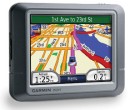
In general GPSes feel like they've benefit from competition in general, and give the sense that they've really been listening to consumer complaints and suggestions... my new Garmin nüvi 260 (three cheers for umlauts!) shows 4 years of improvements in the following ways:
- USA and Canada came preloaded... with the 2610 I had to load software and synch, using this crappy Windowd 3.1-feeling program to parsimoniously select the areas I wanted information on (even with a memory card I was only getting coverage of some of the USA.)
- The thing has a battery so a momentary loss of power doesn't cause it to drop everything
- The touch screen is more responsive and in general the typing UI is improved, it guides you through entering addresses and it stops having you type once it can only give you a few options.
- The view is 3D and like I noted on my mom's at first I thought this was a gimmick but it actually plays a nice, subtle role in emphasizing the most relevant streets. (Still need to figure out, if I zoom out enough so it switches to 2D, is there any way to get it to say "North is always up"... I hate the view with the Atlantic on the
rightleft. (duh, thanks LAN3)) - I haven't received proof of this with mine yet but I've seen how newer models do a much better job of picking up on poor satellite signals.
- My old one talked to me, but this one even reads street names! This seemed frightfully impressive until I remembered my Commodore 64 was doing the same thing in 1982. Only the US Female voice (and not the UK accent, which is my mom's preference for her Tom Tom) does this trick, and the end result in both sound and form is much like the psychotic computer GlaDOS from the videogame Portal.
- Calculator! World Clock! Currency Convertor! (Can you hear the scoffing?)
- It's tiny and light... and about a third the price of my old beloved brick.
Mostly, though, they seem to be working to keep the screen uncluttered, so there only readouts on the map are "ETA" and "distance 'til turn". The 2610 had "current time", "time 'til turn" and most importantly "current speed"... I got spoiled by having a digital read out of speed handy, I still think digitally and reading from analog (on a speedometer, or even when looking at a clock) takes a mental cycles to convert.
(heh, just to throw some cold water on this, there are some rumors that the next iPhone will have real GPS... assuming that has the same real time highway traffic data that I think their Google maps already has, that might really be something.)
Anyway, I still think anyone who ever drives anyplace they don't know intimately should get one of these. I've found this cheap at thrice the price... it is to driving what cellphones are to making plans, just bringing up a ton of flexibility and security.
young black guy working at dunkin has a ROXBURY hand tattoo--guess the gangsta aspect weirds me out but hey its my neighborhood now.
all right! t worker says I can transfer my pass to my tap and go card at downtown crossing, no problem.
living and working in Boston proper has its advantages. the number of gorgeous gals in little nothings of sundresses... yow